Ask what matters. Remember what was agreed.
Use your services, pricing and the customer’s history. Collect only the missing essentials, keep promises visible and bring the next useful step to the team.
PRIVATE BETA · BUILT FOR SERVICE BUSINESSES
Your leads, conversations, and jobs. One workspace.
AI helps with the next step. You stay in control.
Built by a service-business operator.
Set up with you, around the way you work.
 bazas.ai
One customer. The next step stays connected.
01 / THE WORKFLOW
The useful part is knowing what happens next. Explore an illustrative workflow, from the first message to a reviewed response and a shared job record.
Keep the request and the customer together, even when your team is busy.
 bazas.aiILLUSTRATIVE EXAMPLE
Incoming call
Your AI dispatcher
From the first enquiry to the final follow-up. Bazas connects the conversation, the work and the next decision — so your team can focus on the customer.
We are implementing this connected dispatcher experience. Start with an agreed pilot; expand automation as each workflow is checked with your company.
Choose how much to delegate
You stay in charge. AI follows the conversation, spots missing details and prepares the next step. Reviewing a suggestion does not send a message or change a booking.
Illustrative workflow · rollout scope
Use your services, pricing and the customer’s history. Collect only the missing essentials, keep promises visible and bring the next useful step to the team.
A marketplace enquiry can continue by SMS or email without losing its context. We are connecting source-specific rules, email threads and human handoff across supported channels.
Coordinate suitable technicians, availability, job duration and travel. Handle changes and cancellations, and alert a person when a decision or response is missing.
Connect preliminary estimates, customer approval, attachments, additional work and the invoice. Keep the accepted scope visible instead of asking your team to enter it again.
A customer saying “paid” is not confirmed funds. Connect verified or manually recorded payments, balances and receipts; update reminders when the situation changes.
Build a clear path for feedback, complaints and warranty questions. Keep service follow-up separate from marketing, and stop when there is no useful next action.
Five connected layers shape the dispatcher we are building. A company’s rules and a customer’s needs belong in the same decision.
The rollout includes human-only work with optional AI suggestions, first replies, collecting details, consultation and estimates, booking for approval, automatic booking and an agreed full workflow. Custom combinations keep your approval points and individual pauses.
FROM ENQUIRY TO AGREED WORK
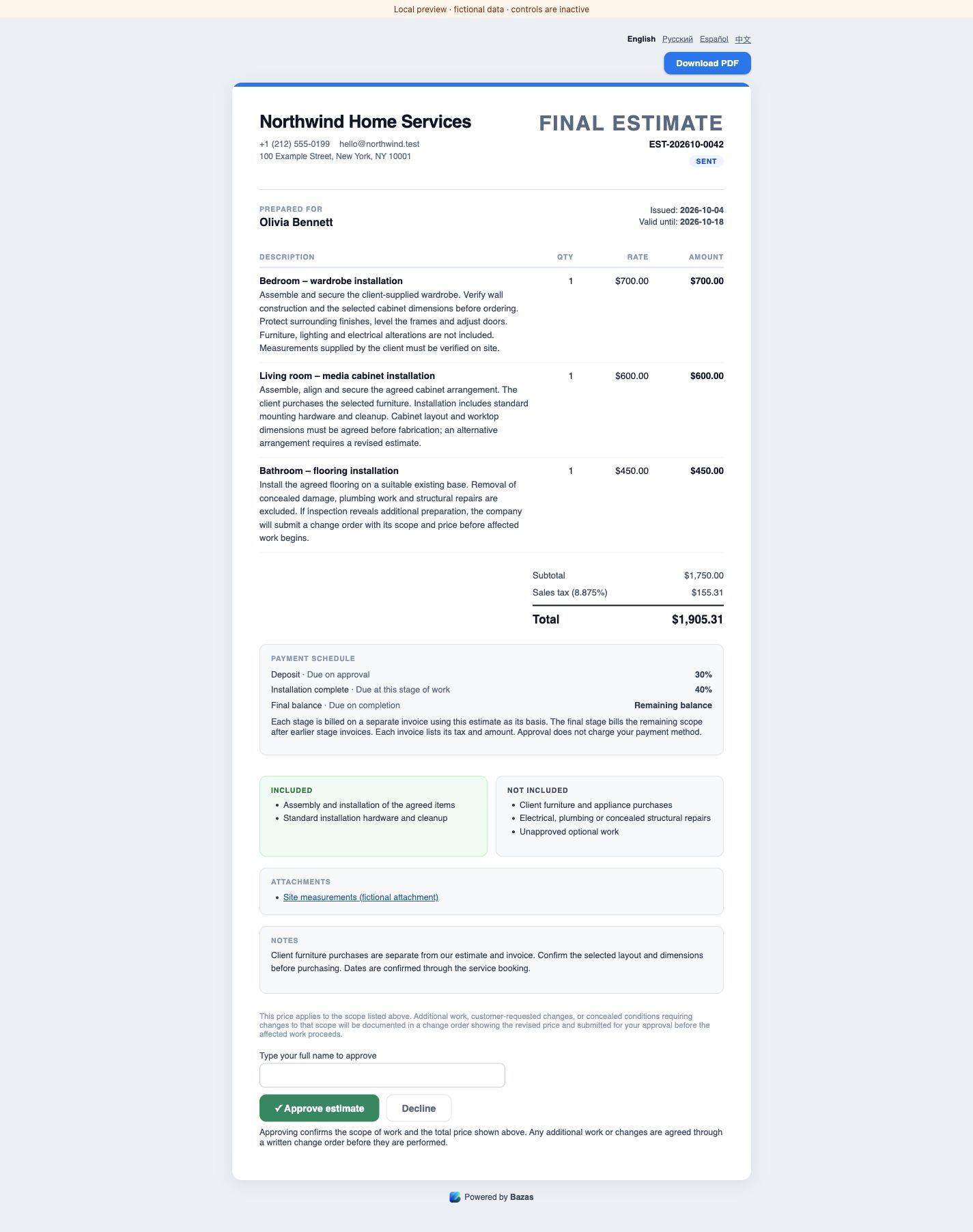
One customer context connects the estimate, agreed work and customer documents. Explore the steps and see local product previews with fictional data.
Pilot can prepare an estimate from the job context. Your team checks the scope, prices and recipient before sending the customer a link.
A preliminary range can be refined after an inspection.
Discuss this workflow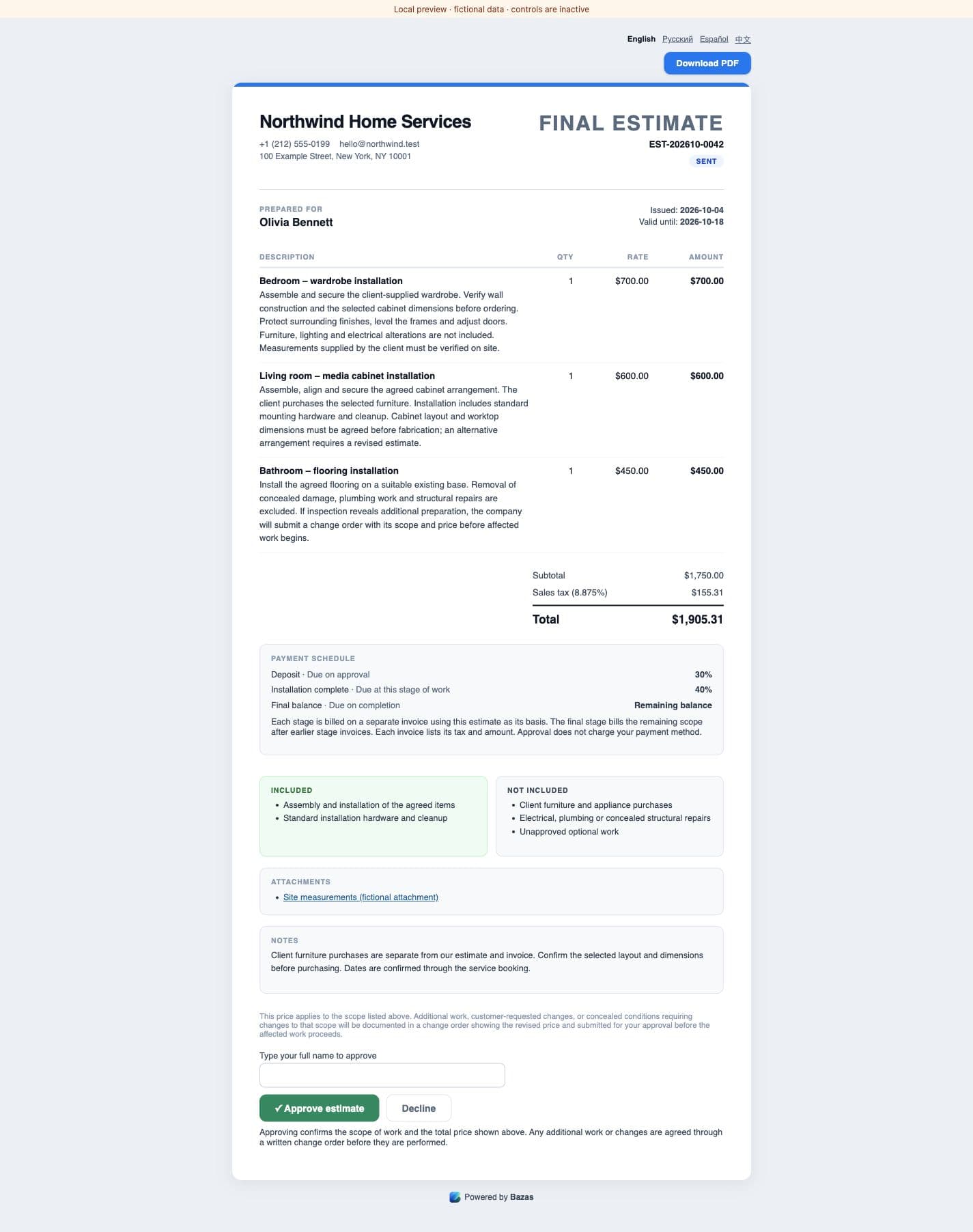

The previews use fictional data and inactive controls. The interface shown is in English; website languages and document languages differ. Confirm the workflow with us during setup.
02 / THE WORKSPACE
Keep the conversation close to the work. Start with the workflow your business needs most, then build from there.
Customer details, supported incoming messages and the next action stay together. Authorized team members see the available context behind the request.
Services, policies, and customer context help shape a useful draft. Review it, edit it, or take over.
Keep jobs, scheduling, estimates, and invoice details connected. Confirm the workflows in scope before your team relies on them.
Use the invited web workspace for the office workflow. An iPhone companion is in TestFlight testing for selected field tasks; access and build scope are confirmed separately.
Discuss your setupIntegrations and automation depend on your accounts, permissions, and agreed pilot setup. See what we check together
BUILT AROUND REAL WORK
The enquiry is only the beginning. Keep the conversation, the field work and the paperwork connected—with AI helping at the steps you review.
MILEAGE JOURNAL
Internal testingAutomatic iPhone trip recording is in closed testing. Review the collected routes and classify business or personal travel. We check recording and a real PDF or CSV export in the agreed pilot.
Review trip → classify → export
Detailed trips are visible to the person who made them.
AI RECEIPT CAPTURE
Pilot with setupAI reads the store, date, totals, tax and line items from a receipt. Check the result, correct it and link the purchase to a customer or job.
Receipt photo → fields → your review
Expenses and supporting documents collected for your review.
TAX & BOOKKEEPING
Pilot with setupReview income, expenses and supporting records. QuickBooks invoice and payment sync, supported Plaid bank imports and selected exports are separate connections to check for your workflow.
QuickBooks · Plaid · selected CSV exports
Confirm tax settings and records with your accountant. Bazas does not file taxes.
AI ESTIMATES & INVOICES
Pilot with setupAsk Pilot to prepare an estimate or invoice with line items, prices and agreed job context. Review the preview, confirm the draft and send it as a separate step.
“Draft an invoice from the accepted estimate.”
Keep the accepted version, attachments, payment stages and separately approved additional work together.
PILOT & REMINDERS
Pilot with setupAsk Pilot to prepare a reply, payment reminder or visit reminder. Check the recipient, message and channel before confirming a supported action. Manage scheduled messages and internal next steps.
“Schedule a payment reminder for tomorrow at 9.”
Pilot review and separately enabled customer automation have different controls.
CUSTOMER INBOX & EMAIL AI
Pilot with setupKeep conversations from connected channels in the customer context. AI helps summarize and draft replies. Business email is connected with founder assistance; each company’s mailbox and delivery route need their own setup.
“What did we promise, and what needs a reply?”
Private Gmail receipt import is a separate, read-only connection.
VOICE RECEPTIONIST
Pilot with setupAn AI receptionist can take enquiries on a configured business line. Check calendar booking and transfer to a person during working hours together. New after-hours handling and browser calling are separate releases.
Enquiry → availability → booking or handoff
Available call notes and recordings follow provider settings and staff permissions.
JOB LOCATIONS & ETA
Pilot with setupKeep the service address attached to the job. Mark yourself on the way and request a driving ETA; available Google Maps traffic data improves the estimate.
Confirmed address → route → arrival estimate
An ETA is an estimate; automatic arrival messages need separate acceptance.
CUSTOMER PORTAL
Pilot with setupShare a company-branded place for customer projects, documents and contact with the team. Access is by link, with available actions and access recovery checked during pilot setup.
Shared link → intended documents → contact the team
Website translations and document languages may differ.
A CLEAR START, A VISIBLE NEXT STEP
Reviewed
Choose the supported channels and documents your team needs. We confirm the account connections, access and result before relying on the workflow.
Selected iPhone tasks and automatic trips are being tested. The available build, device access and accepted scope are confirmed separately.
These releases have their own acceptance steps. They are not included automatically when you join a pilot.
Availability changes as workflows are accepted for release. Your pilot agreement defines the scope, costs, support and review controls for your company.
YOUR NETWORK, IN THE WORKFLOW
A full calendar or a job outside your scope can still become useful work. Agree a focused pilot for sharing work with trusted providers. Assignment, access, conversations and commission terms are checked separately.
FOR SERVICE TEAMS
Discuss an overflow or specialist job with a trusted provider. Agree the assignment and what customer context can be shared, then follow the permitted work history.
FOR REFERRAL OPERATORS & SMALL AGENCIES
Bring customer relationships and a trusted contractor network. Test a limited workflow for assigning work, following permitted conversations and recording agreed commercial terms. A shared multi-company dispatcher and automatic payouts are separate milestones.
Discuss your workflowAgree the service, area and information that can be shared.
Confirm the sharing rulesConfirm the assignment and the provider’s access to the customer context.
Access follows the assignmentCheck the permitted shared conversation and the author of each reply.
A shared record of the workAgree percentage or fixed commercial terms for the selected workflow. Recording terms does not move money.
Clear commission termsFind a path for overflow and specialist work without rebuilding the customer story in another chat.
Agree who can see the shared work and which actions remain visible to the originating company.
Agree the terms before handing off work, then confirm the result separately from settlement.
03 / HUMAN CONTROL
Begin with reviewed drafts and a focused workflow. Agree your service boundaries, timing, costs, and handoff rules before enabling customer-facing automation.
How we handle your dataRead and edit the proposed reply.
Handle the conversations that need you.
Agree what automation can do before it goes live.
04 / BUILT FROM THE FIELD
Bazas grew out of running Repair ASAP. The goal is practical: less time chasing messages and details, more time doing the work customers called for.

Founder & Builder
Start with the part of your day that needs to work better.
Apply → Discuss fit → Agree the scope → Get invited
05 / BEFORE YOU JOIN
Private beta means a considered start. Clear expectations before your first day.
Pilot terms and plan referencesApply with your company and the workflow you want to improve. Nikita reviews the fit, walks through your lead flow, and agrees on a pilot scope before creating or inviting you into a workspace.
Small service businesses and contractors in the U.S., starting with New York City. We also discuss focused pilots with referral operators and small agencies. We check your services, team, channels and must-have workflow together.
Start with reviewed drafts. Customer-facing automation is enabled only for agreed channels after setup and testing. Pricing, service boundaries, recipients and human handoff are reviewed with you. New after-hours and dispatcher calling workflows are separate releases.
We check your accounts, permissions, and provider limitations before setup. SMS, email, voice, website, Yelp, Thumbtack, and calendar workflows can require founder assistance. Listing a channel does not guarantee that every account or workflow is supported.
The web workspace is available by invitation. An iPhone companion is being tested through TestFlight and is not publicly available on the App Store. Access, the supported build, and the field workflows available are confirmed separately before onboarding.
Access, duration, limits and subscription or external AI, SMS and call costs are agreed before setup. An individually agreed free pilot may be possible. Applying does not create an account or start a subscription.
We discuss your import, export, and staff access requirements before onboarding. Available formats and export scope depend on the workflow. Start with one useful process and agree a migration plan before moving more records.
Use the Support page or email support@bazas.ai. Include your company, the affected workflow, and what happened. Please leave out passwords and API keys. We agree the support arrangements during onboarding.
LET’S TALK ABOUT YOUR BUSINESS
Tell us what you do and what you want to make easier. Nikita will review the fit and discuss a practical pilot with you.
Access is by invitation. Pilot scope, duration, limits, and costs are agreed before setup. Applying does not start a subscription.
Prefer email? hello@bazas.ai